← All flows
Fitness

Zumba onboarding flow

22 screens · Screen Recording · recorded Oct 2026
FitnessSoft paywall · trial optionalpaywall: post onboarding quizquiz drivengoal settingannual default with trialfeature listpricing anchor strikethrough

Zumba pricing and paywall terms

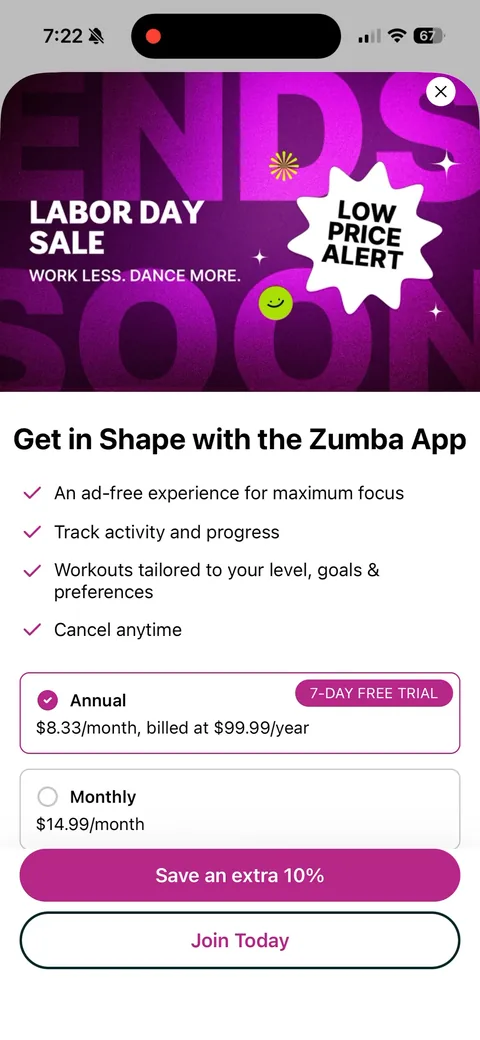
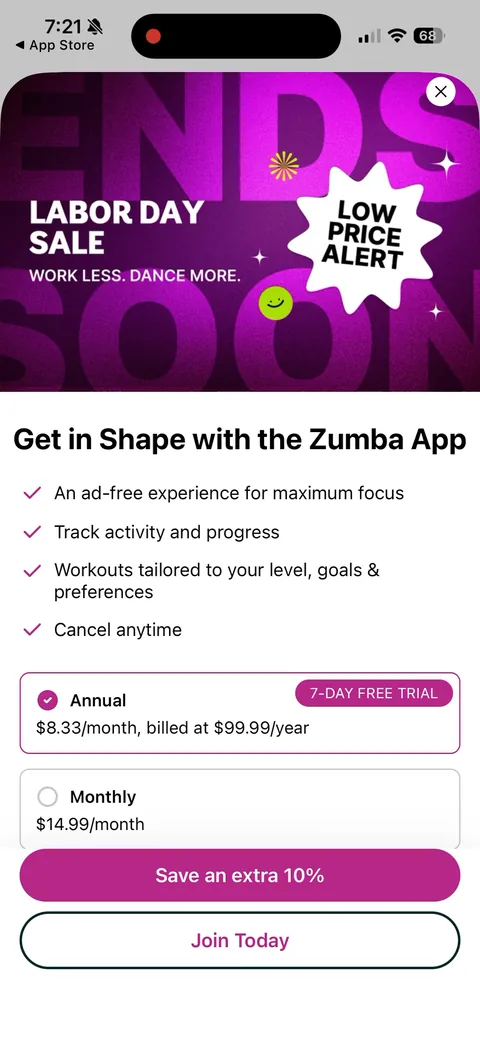
Labor Day Sale: Annual $99.99/yr ($8.33/mo) with 7-day free trial (default) vs Monthly $14.99. Two CTAs: 'Save an extra 10%' (web checkout, $89.99/yr or $13.49 first month via SAVE10WEB) and 'Join Today' (Apple IAP, $99.99/yr, 1-week trial).

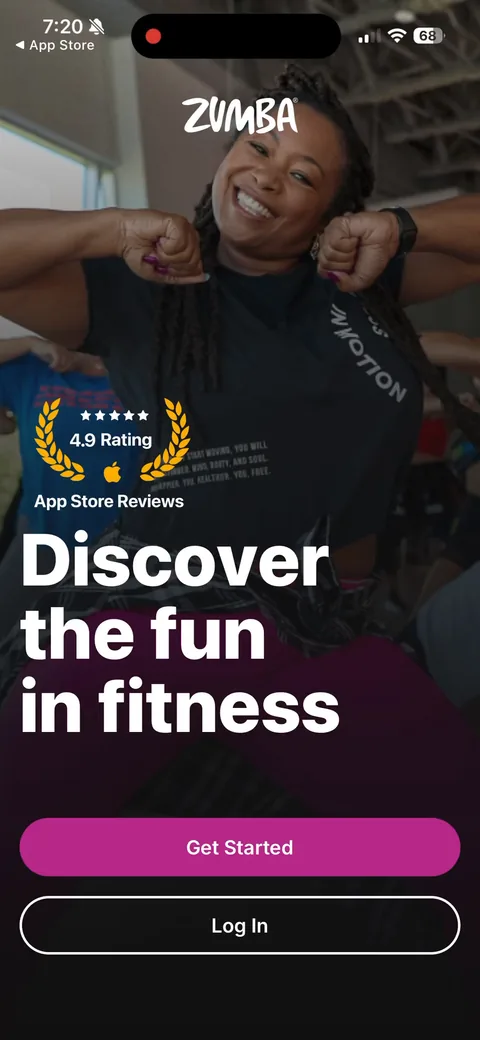
Zumba onboarding screen 1: 4.9 rating in App Store laurels on the very first screen, then 1
4.9 rating in App Store laurels on the very first screen, then "Discover the fun in fitness." Leading with fun instead of results is the right call for Zumba. Nobody signs up for a dance class to grind.
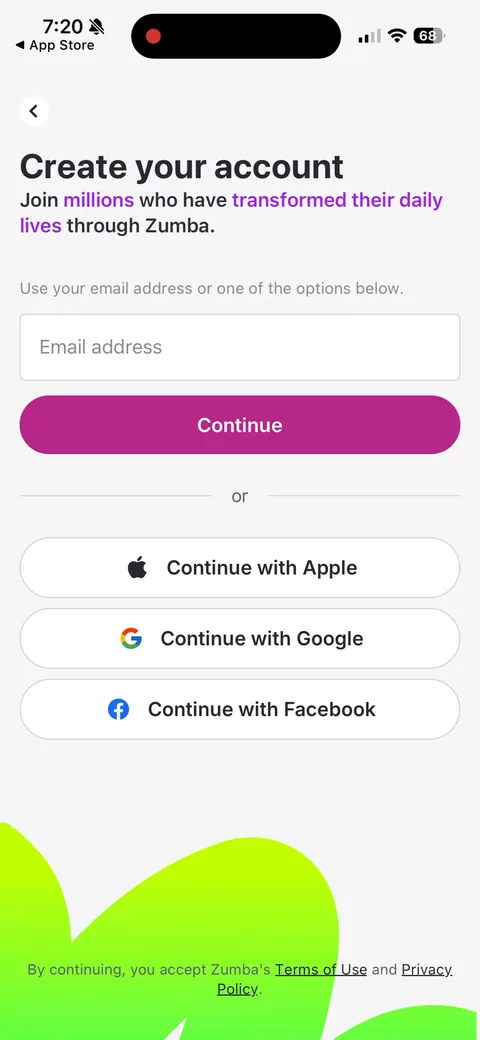
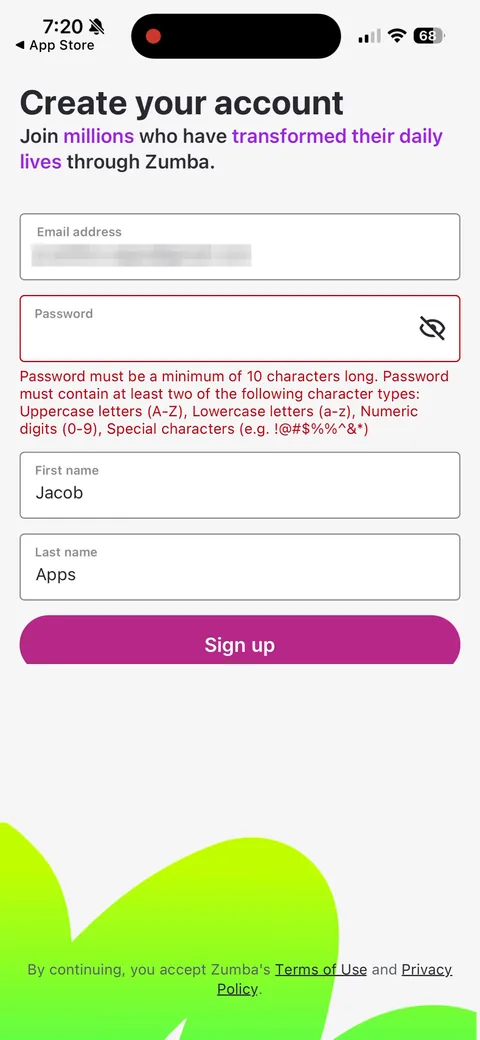
Zumba onboarding screen 3: Account creation before a single question3
Account creation before a single question. "Join millions who have transformed their daily lives" softens it, but this is signup before any value. I'd test moving it after the class match, when people have a reason to save something.
Zumba onboarding screen 7: 7
"Password must be a minimum of 10 characters long" plus two character types, shown as a red error after you've already typed. That's a lot of friction this early. Show the rule up front, or push people to Sign in with Apple.
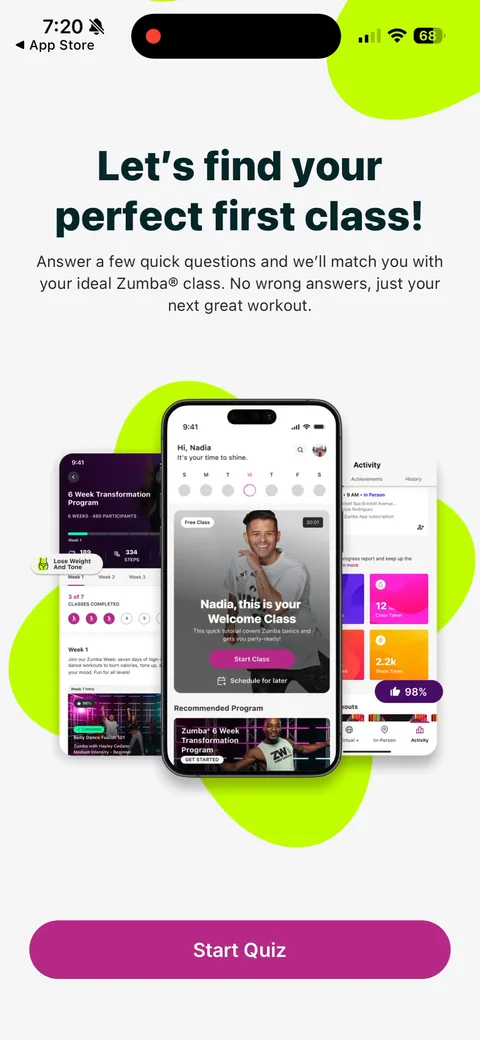
Zumba onboarding screen 9: 9
"Let's find your perfect first class!" Good framing. The quiz has a concrete payoff (a class), and "No wrong answers" lowers the stakes for beginners.
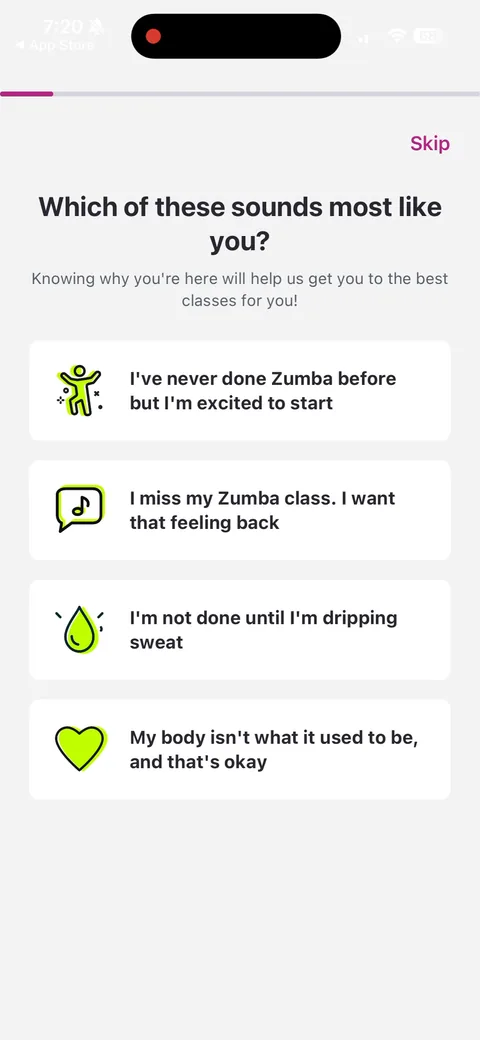
Zumba onboarding screen 10: 10
"Which of these sounds most like you?" with motivations written in the user's voice: "I miss my Zumba class", "I'm not done until I'm dripping sweat", "My body isn't what it used to be, and that's okay." Great copy. It segments lapsed members from first-timers in one tap. I'd make it multi-select though.
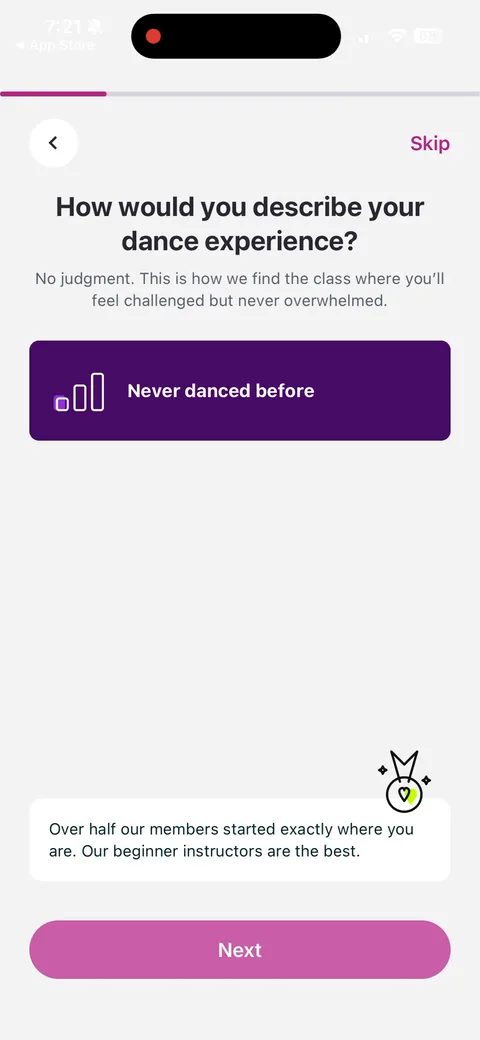
Zumba onboarding screen 11: Pick 11
Pick "Never danced before" and you get instant reassurance: "Over half our members started exactly where you are." Answer-specific feedback like this makes the quiz feel like a conversation, and it handles the biggest objection for a dance app.
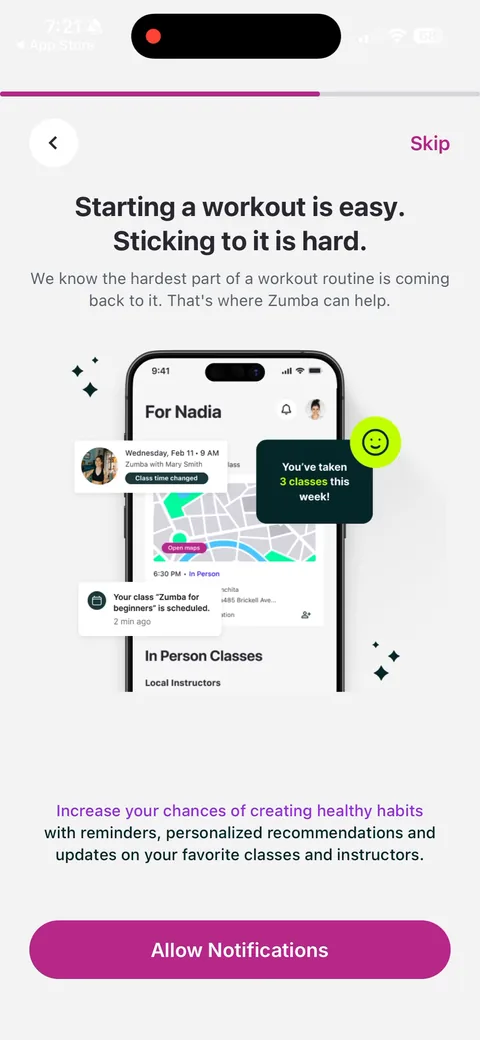
Zumba onboarding screen 12: Notification primer framed around the real problem: 12
Notification primer framed around the real problem: "Starting a workout is easy. Sticking to it is hard." The mock lock screen shows the payoff ("You've taken 3 classes this week"). Selling notifications on a specific benefit is how you should do it.
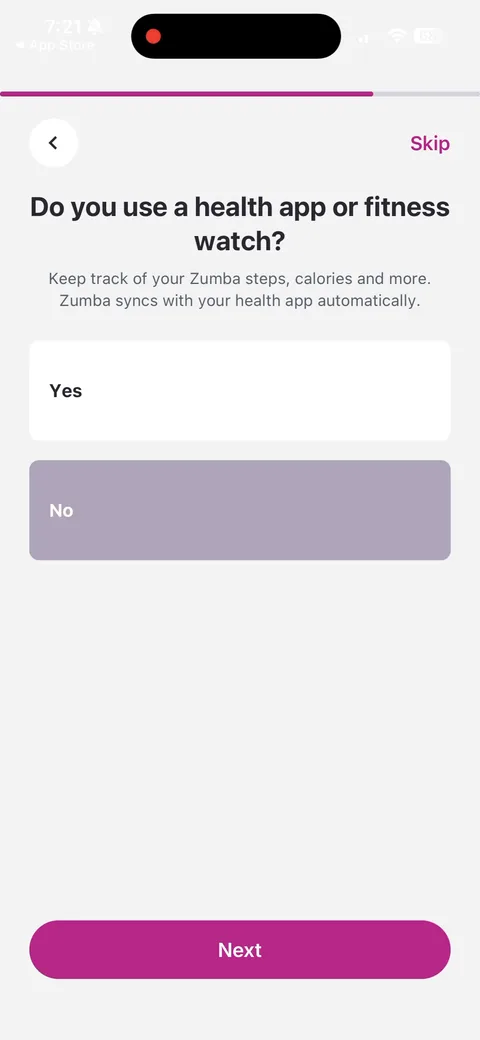
Zumba onboarding screen 13: Asks about a health app or fitness watch to sync 13
Asks about a health app or fitness watch to sync "steps, calories and more." Answering No skips the permission ask entirely, which is a good way to avoid a wasted system prompt.
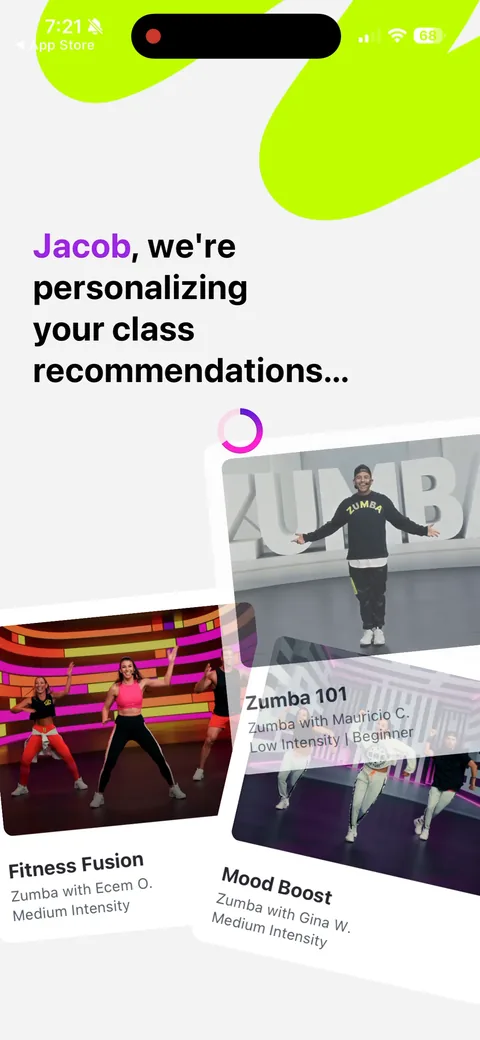
Zumba onboarding screen 14: 14
"[Name], we're personalizing your class recommendations..." with real class cards animating behind it. A loading screen that uses your name and shows actual content reinforces the work the quiz just did.
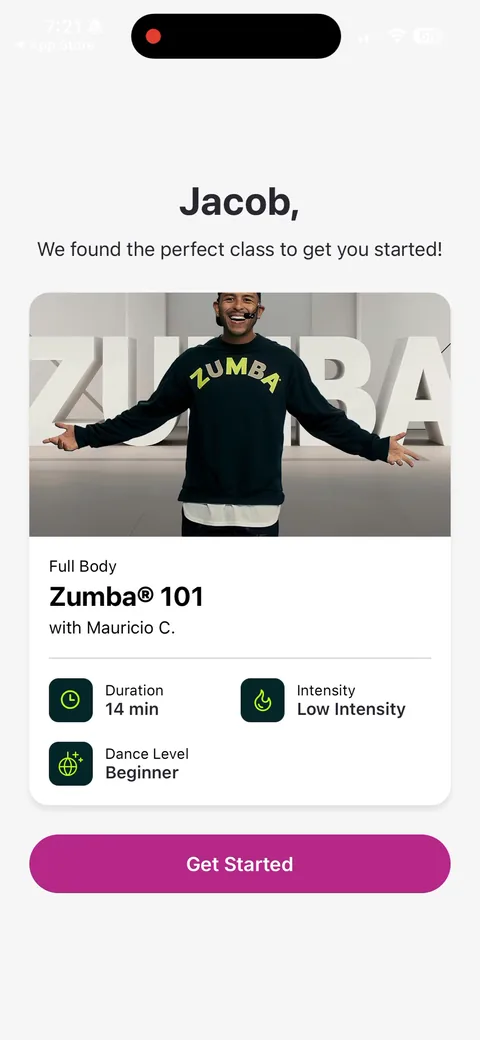
Zumba onboarding screen 15: The payoff: one specific class, 15
The payoff: one specific class, "Zumba 101 with Mauricio C.", 14 min, low intensity, beginner. A single concrete recommendation beats a generic plan. It maps straight back to "Never danced before."
100% free
12 more screens

See the rest of this flow.

You are 10 screens into Zumba. Enter your email to unlock the remaining 12, plus every other teardown in the library.
100% free, just your email.
Zumba paywall with pricing, onboarding screen 1616
The paywall, wrapped in a "Labor Day Sale / Low Price Alert" banner. Annual with 7-day trial is the default at $99.99/yr, monthly $14.99. The interesting part is the two buttons: the filled primary is "Save an extra 10%" (a web checkout) and the outlined secondary "Join Today" is Apple IAP. They're making the web path the default action and paying 10% for it, which still beats Apple's cut.
Zumba onboarding screen 18: Tap 18
Tap "Save an extra 10%" and you leave the app for zumba.com. The app behind it already lands on Home, so whether you buy or not you come back to a guided "Finding your fit" series, not a blank screen.
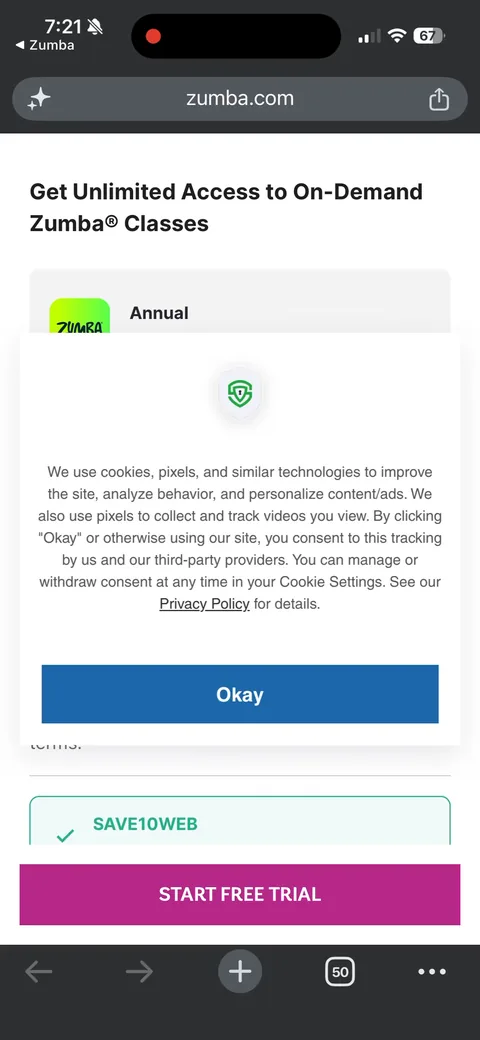
Zumba onboarding screen 19: First thing on the web: a cookie consent modal covering the checkout19
First thing on the web: a cookie consent modal covering the checkout. Every extra tap in an app2web hand-off costs conversion, and this one is pure overhead.
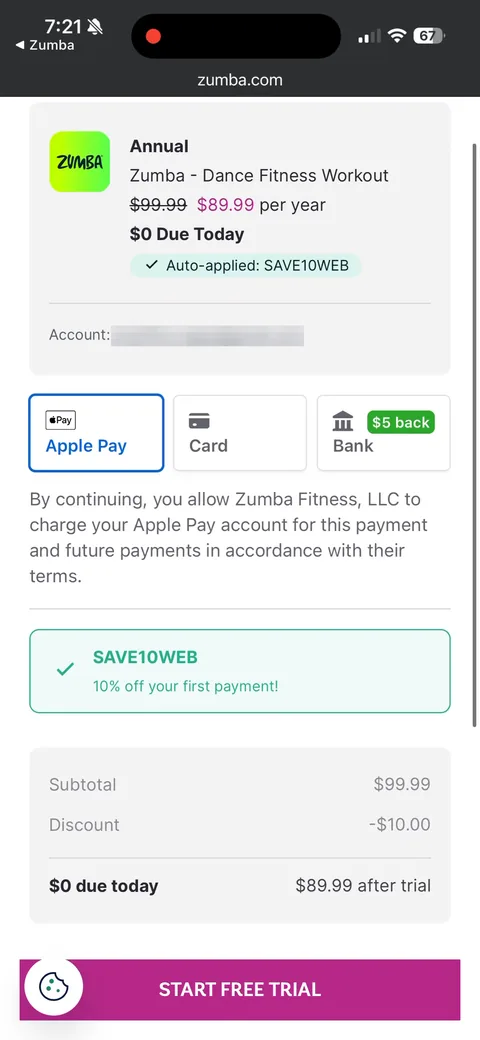
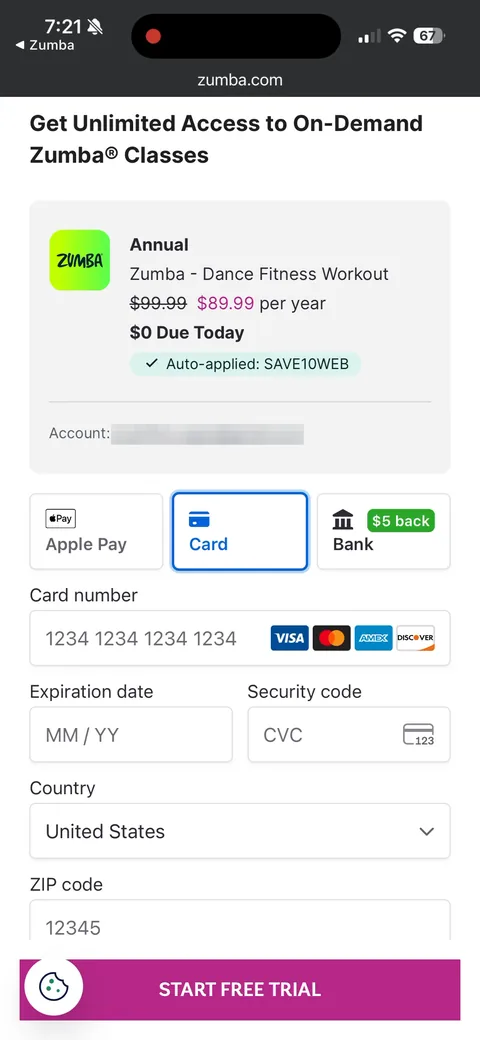
Zumba onboarding screen 20: Web checkout: Annual $99.99 struck through to $89.99, 20
Web checkout: Annual $99.99 struck through to $89.99, "$0 Due Today", "Auto-applied: SAVE10WEB." The discount is pre-applied and the account is carried over from the app, so there's no login step. Apple Pay is the default, which keeps it close to the one-tap IAP experience.
Zumba onboarding screen 21: 21
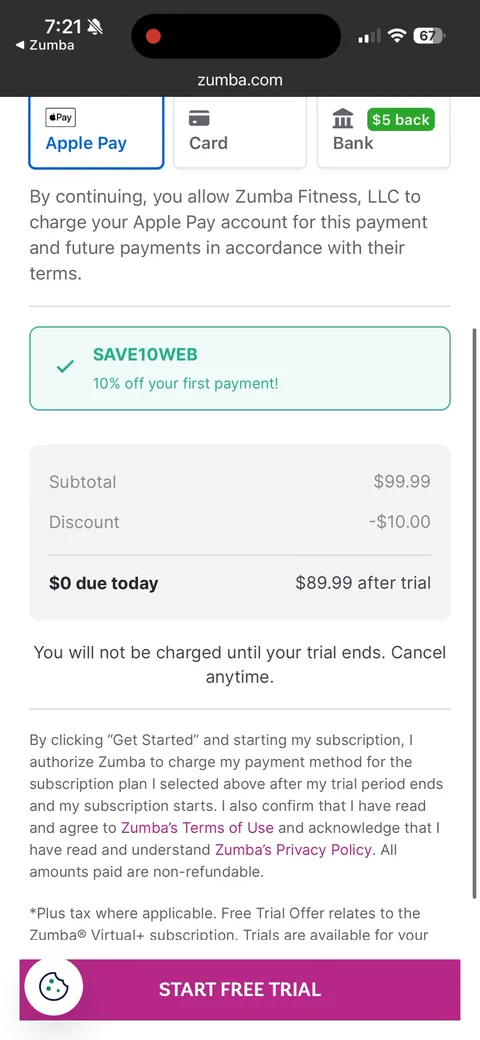
"$0 due today, $89.99 after trial" with "You will not be charged until your trial ends. Cancel anytime." Same 7-day trial as IAP, $10 cheaper after. Clear trial terms help here since web checkouts feel less safe than Apple's sheet.
Zumba onboarding screen 25: Three payment options: Apple Pay, Card, and Bank with a green 25
Three payment options: Apple Pay, Card, and Bank with a green "$5 back" badge. Paying people to use bank transfer is clever. It's the cheapest rail for them, so they share the savings to push it.
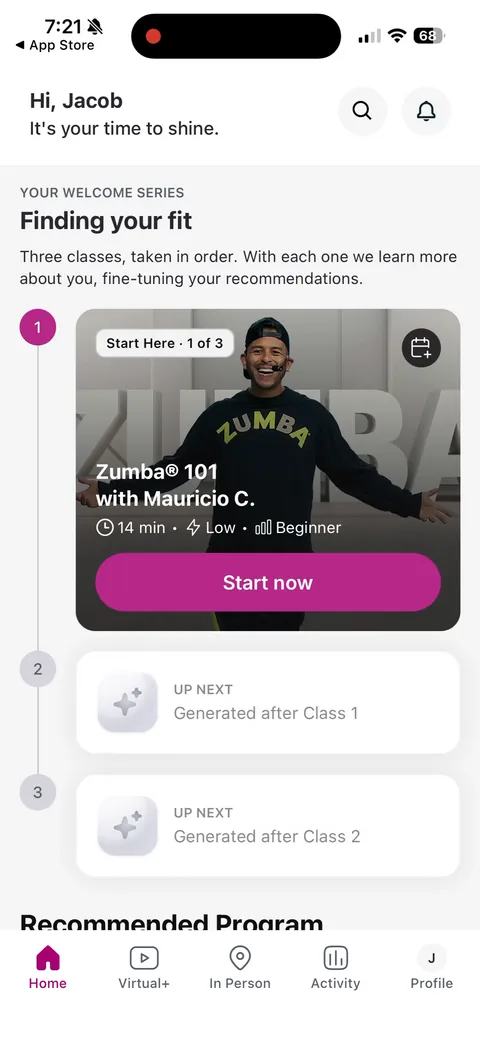
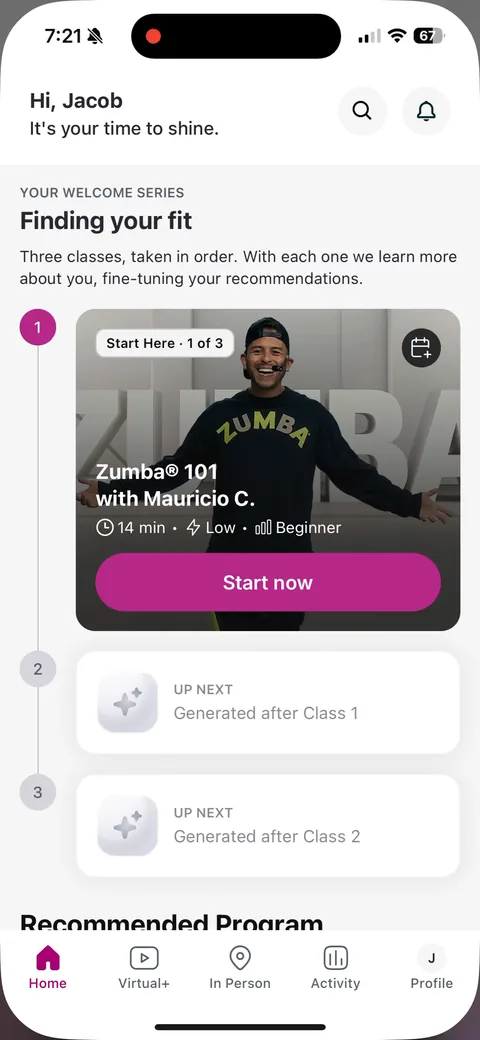
Zumba onboarding screen 29: Back in the app: 29
Back in the app: "Your welcome series, Finding your fit." Three classes in order, with classes 2 and 3 "Generated after Class 1." A guided first task instead of a dashboard, and the recommendations keep personalizing as you go. Nice post-paywall activation.
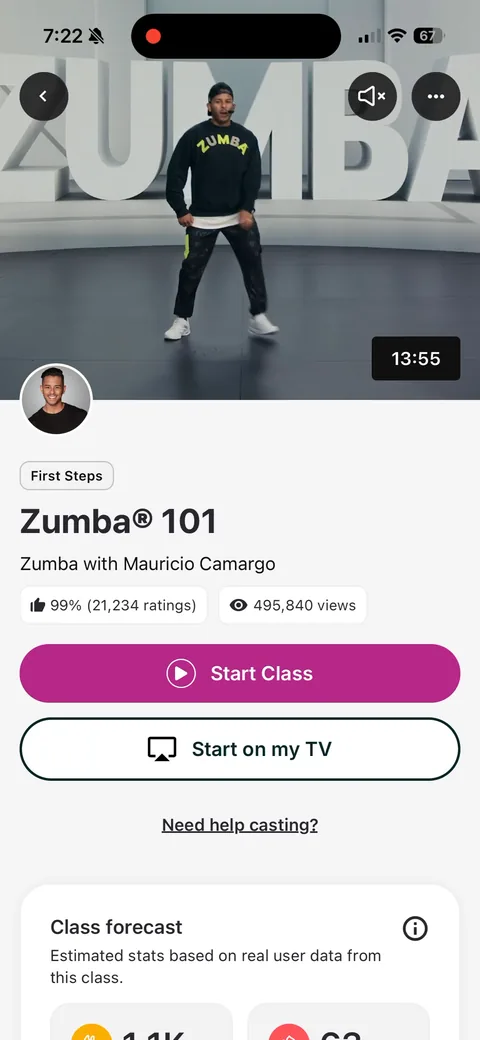
Zumba onboarding screen 31: The recommended class page: 31
The recommended class page: "99% (21,234 ratings)", "495,840 views", "Start on my TV", and a "Class forecast" of estimated stats. Social proof at the class level makes a 14-minute commitment feel safe.
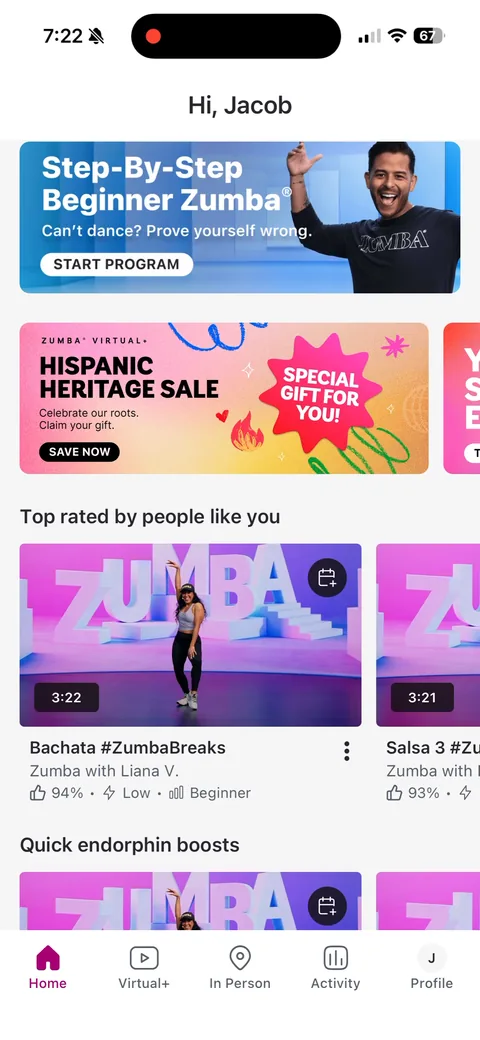
Zumba onboarding screen 33: Scrolling home shows a 33
Scrolling home shows a "Hispanic Heritage Sale, special gift for you" banner, while the paywall is running a "Labor Day Sale." Two different sales in one session. Promotions are clearly baked into the merchandising, but stacking them dilutes both.
Zumba onboarding screen 35: Same paywall again, this time tapping 35
Same paywall again, this time tapping "Join Today." That opens Apple's sheet: 1-week free trial, then $99.99 per year. Same trial as the web, $10 more. The IAP option is still there for anyone who won't type a card into a browser.
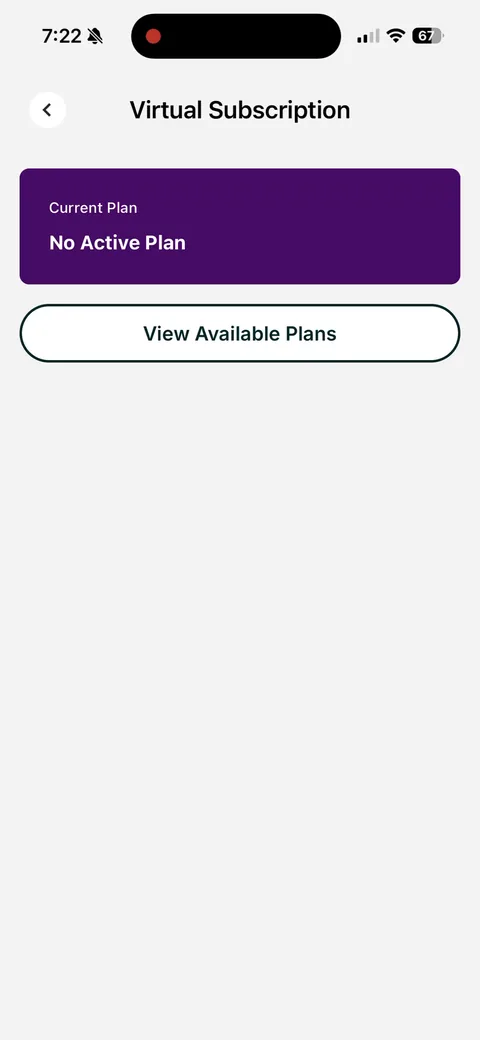
Zumba onboarding screen 38: Profile > 38
Profile > "Virtual Subscription": "No Active Plan" with "View Available Plans." A persistent entry point back to purchase outside onboarding, and it routes to the web checkout.
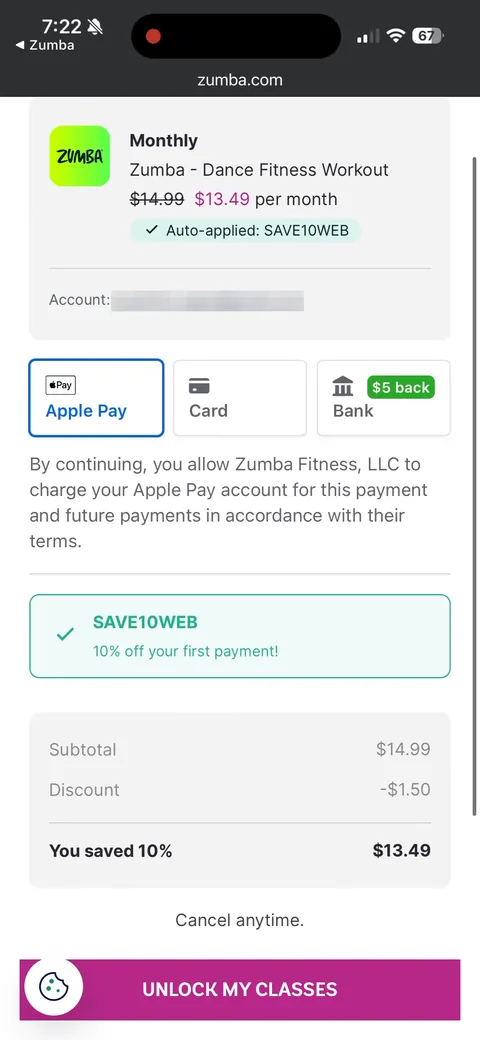
Zumba onboarding screen 41: Monthly on the web: $14.99 struck through to $13.49, 41
Monthly on the web: $14.99 struck through to $13.49, "10% off your first payment." So the web discount on monthly only applies once, while annual gets $10 off the whole first year. The economics push you to annual on either path.