Web2Wave
Integrate Botsi AI Pricing with Web2Wave to optimize web funnel pricing. Web2Wave handles quiz funnels, paywalls, and Stripe-based payments. Botsi decides which paywall each user should see.
The integration uses JavaScript inserted into your Web2Wave quiz flow (via custom JS and the window.w2w API), plus a webhook that reports purchases back to Botsi.
Complete the AI Pricing Model Setup first. This page assumes the Botsi side already works end to end.
Integration flow#
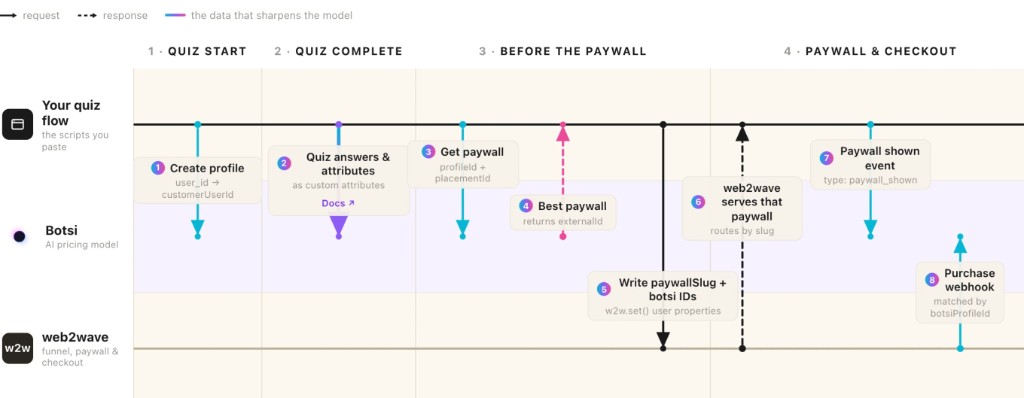
- Create a Botsi Profile at quiz start.
- Send quiz answers and attributes after the quiz completes.
- Call Fetch Paywall → receive
externalIdandpaywallSessionId. - Write
paywallSlugand Botsi IDs withw2w.set()so Web2Wave can route and webhooks can attribute. - Web2Wave serves the paywall matched by that slug.
- Send
paywall_shownwhen the paywall is displayed. - Purchase webhook from Web2Wave → Botsi (matched by
botsiProfileIdand related properties).
See the full API sequence in the AI Pricing Model API.
Webhook setup#
Do this once per product. Skip if webhooks are already configured.
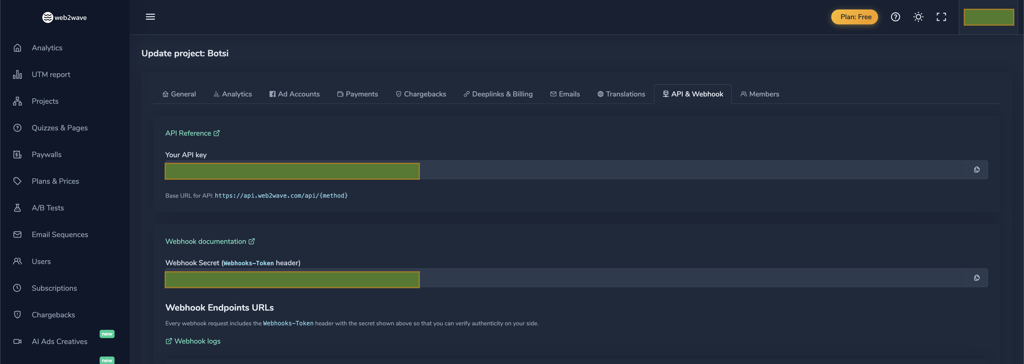
- In Web2Wave, open Edit Project → API & Webhooks and copy your webhook secret. Paste it into Botsi App Settings.
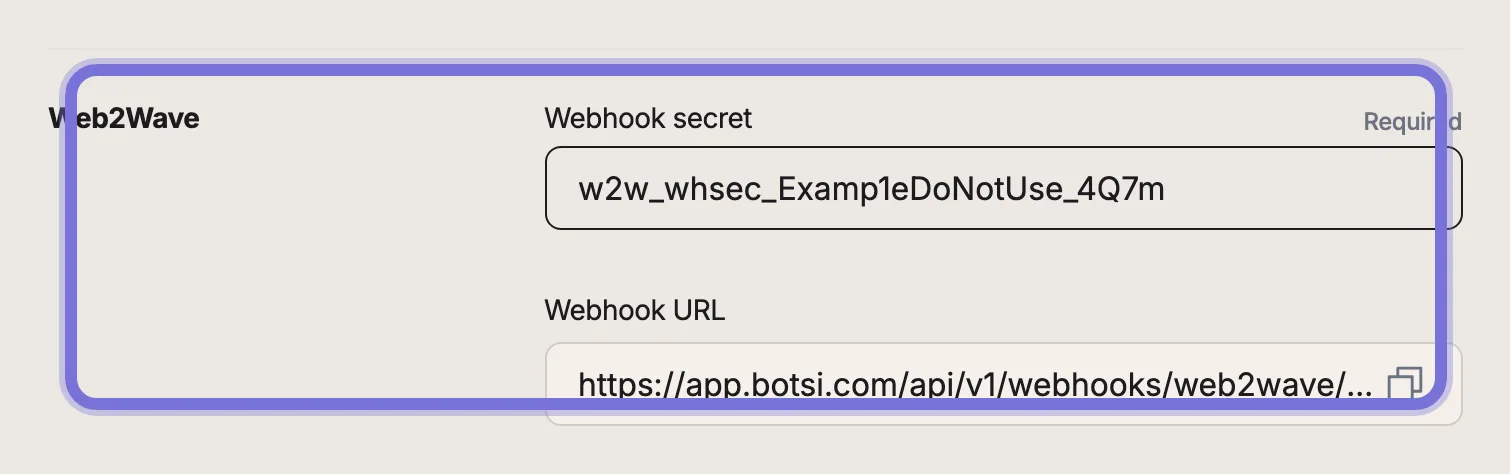
- Copy the webhook URL from Botsi settings into your Web2Wave project's API & Webhooks tab. Web2Wave authenticates delivery with the
Webhooks-Tokenheader (the project secret). See Webhook Documentation. - Add these keys to the
userPropertiesallowlist in Web2Wave so they are included when properties and subscription events are forwarded:
ip
screen_size
user_city_name
user_country_code
user_language
user_platform
user_state_name
user_zip_code
botsiProfileId
botsiPaywallId
botsiPlacementId
botsiIsExperiment
botsiAiPricingModelId
botsiPaywallSessionId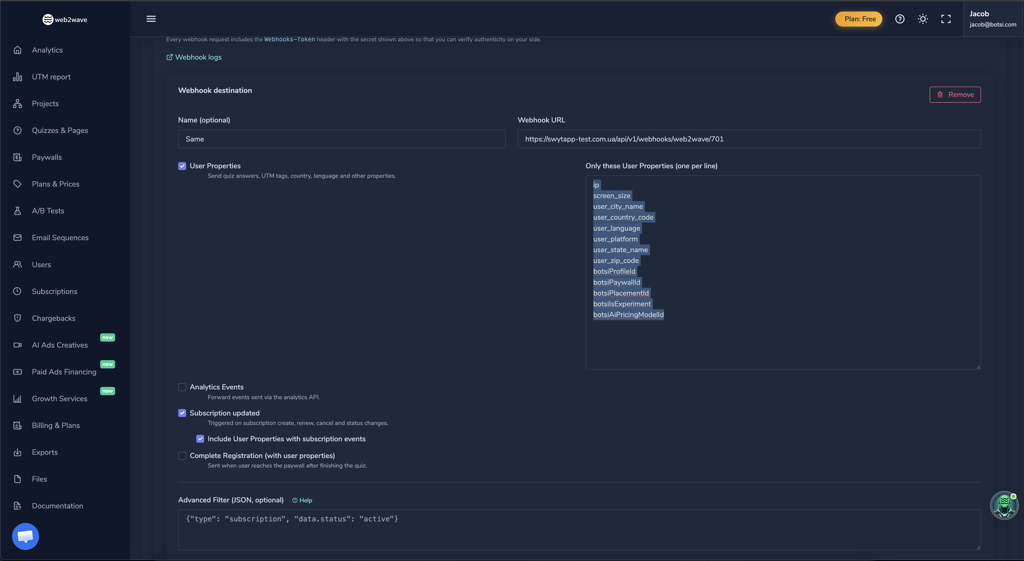
Values you set with w2w.set() travel in webhooks under user properties. Botsi needs the botsi* fields to match the purchase to the right Profile and Paywall decision.
Product setup#
Also once per product.
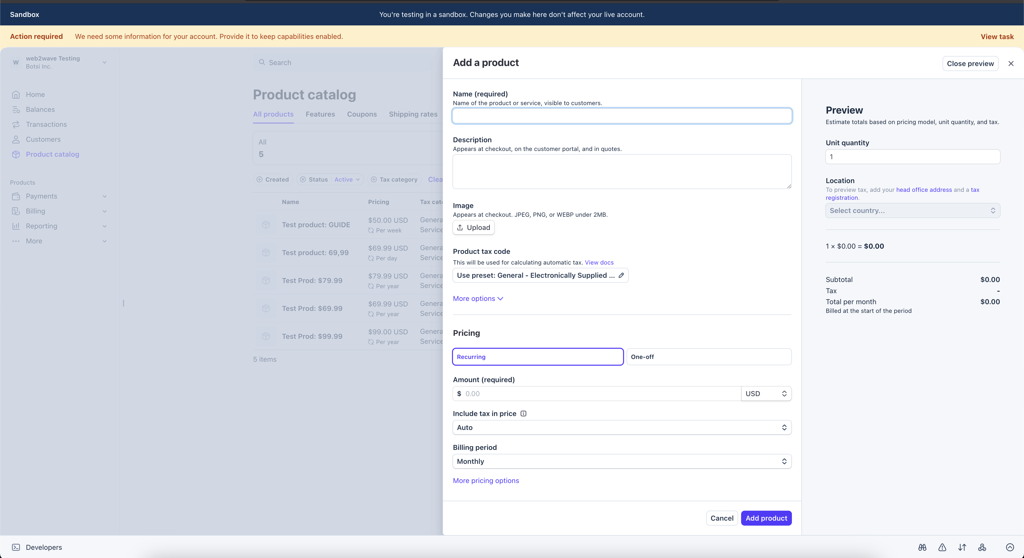
- Create a Stripe product in your Stripe dashboard.
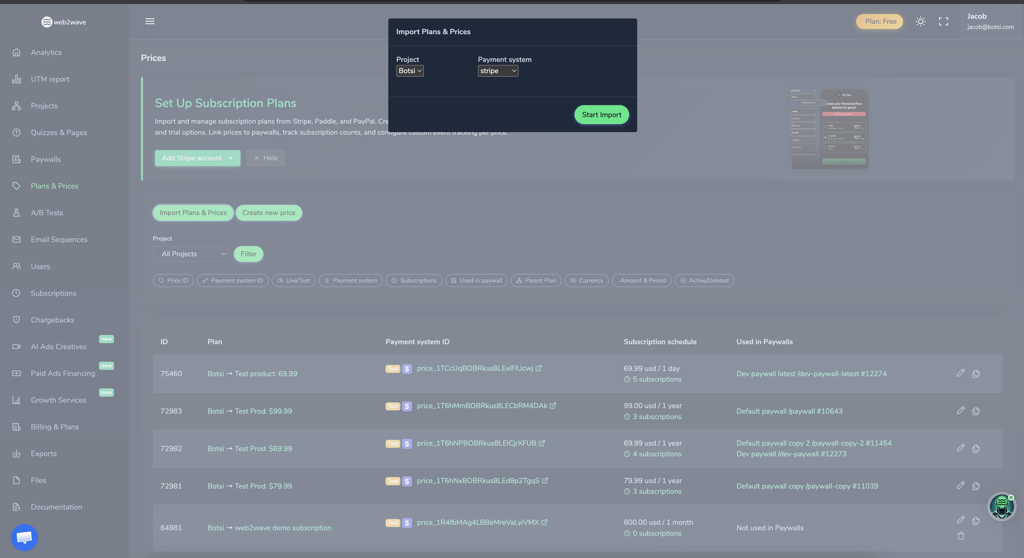
- Sync the Stripe product in Web2Wave under Plans & Prices so it is available when you build paywalls.
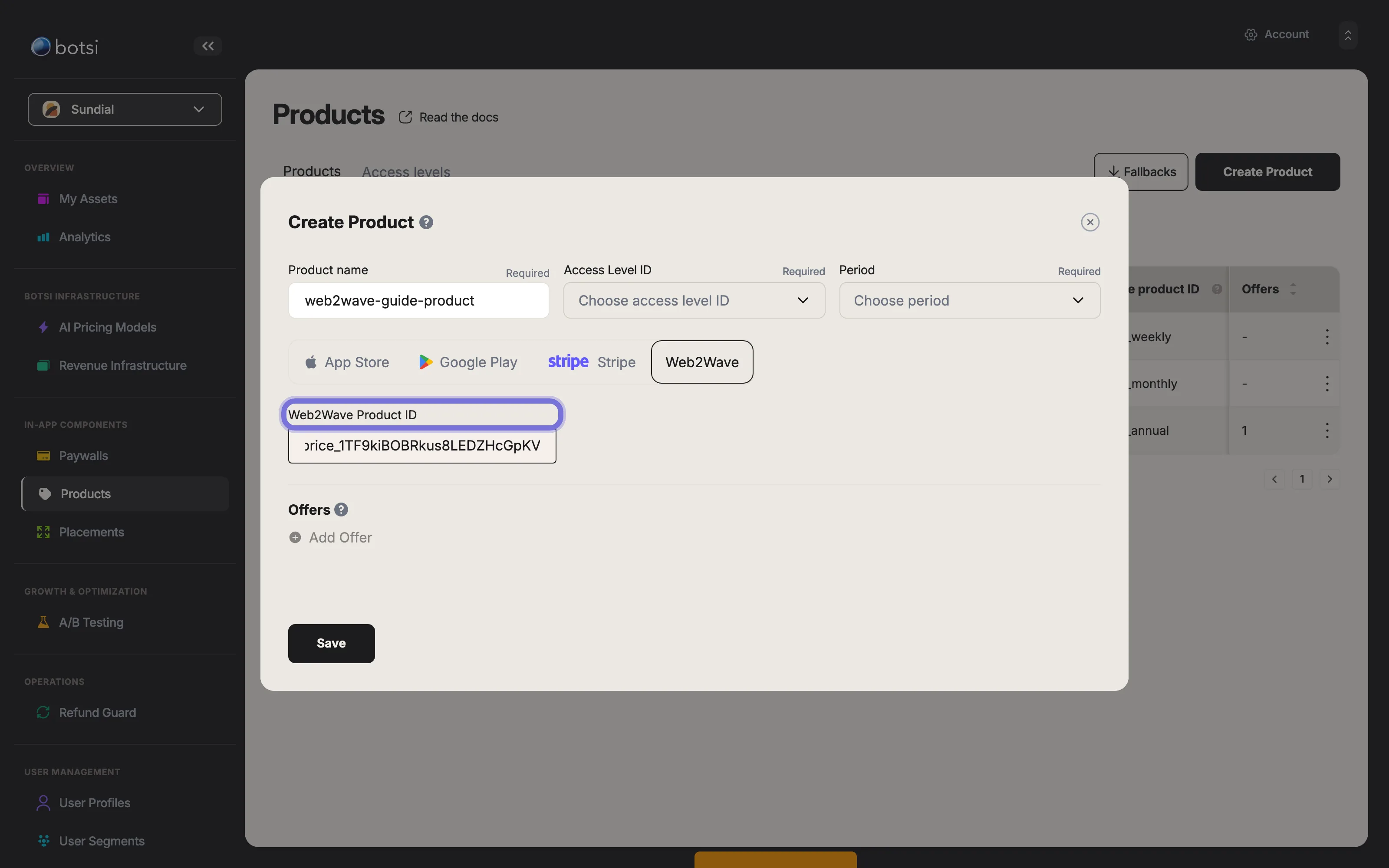
- Create a Botsi Product and set the Stripe price ID as the
web2wave_product_id.
Where each script goes#
These scripts run in the browser with your secret key
Every sample below carries the app secret key into client-side JavaScript, where anyone viewing source can read it. That key authorizes reading Profiles and validating purchases across your whole app.
This is the pattern Web2Wave's script insertion requires. Treat it as a deliberate risk to review with your team, not as a safe default, and never reuse that key anywhere it could do more damage.
Set every botsi* value before the paywall shows
w2w.set() values are what webhooks forward under user properties. A missing value at purchase time cannot be recovered later. Set botsiProfileId, attribution fields, and paywallSlug before routing to the paywall.
Creating the Profile#
Insert at quiz start. Web2Wave exposes window.user_properties and window.user_id (also readable via w2w.get()). Use user_id as appUserId so Botsi can match the user.
(async function createBotsiProfile() {
  try {
    const p = window.user_properties || {};
    const u = window.user_id || '';
    const apiKey = 'key...'; // Replace with your Botsi secret key

    const payload = {
      appUserId: u,
      country: p.user_country_code,
      platform: 'stripe',
      locale: p.user_language,
      device: p.user_platform,
      os: /Mac OS X/.test(p.user_agent) ? 'macos'
        : /Windows/.test(p.user_agent) ? 'windows'
        : /iPhone|iPad/.test(p.user_agent) ? 'ios'
        : /Android/.test(p.user_agent) ? 'android'
        : 'unknown',
      appVersion: '2.3.4',
      appBuild: '1.2.3',
    };

    const res = await fetch('https://api.botsi.com/v2/profiles', {
      method: 'POST',
      headers: {
        'Content-Type': 'application/json',
        Accept: 'application/json',
        Authorization: `${apiKey}`,
      },
      body: JSON.stringify(payload),
    });

    if (!res.ok) throw new Error(`Botsi API error: ${res.status}`);
    const data = await res.json();

    if (data.ok && data.data?.profileId) {
      w2w.set('botsiProfileId', data.data.profileId);
    }
  } catch (err) {
    console.warn('Botsi profile creation failed silently:', err.message);
  }
})();
Syncing custom attributes#
Insert after quiz completion. Quiz answers, the initial URL, and geographic data feed LTV prediction — send as much relevant signal as you have. See Add Custom Attributes.
(async function syncBotsiProfile() {
  try {
    const p = window.user_properties || {};
    const u = window.user_id || '';
    const apiKey = 'key...';

    const payload = {
      appUserId: u,
      custom: [
        { key: 'has_app', value: p['has-app'] || '' },
        { key: 'web2app_funnels', value: p['web2app-funnels'] || '' },
        { key: 'initial_url', value: p.initial_url || '' },
        { key: 'ip', value: p.ip || '' },
        { key: 'user_state_name', value: p.user_state_name || '' },
        { key: 'user_zip_code', value: p.user_zip_code || '' },
      ],
    };

    const res = await fetch(
      'https://api.botsi.com/v2/custom-attributes',
      {
        method: 'POST',
        headers: {
          'Content-Type': 'application/json',
          Accept: 'application/json',
          Authorization: `${apiKey}`,
        },
        body: JSON.stringify(payload),
      },
    );

    if (!res.ok) throw new Error(`Botsi API error: ${res.status}`);
    const data = await res.json();

    if (data.profileId) {
      w2w.set('botsiProfileId', data.profileId);
    }
  } catch (err) {
    console.warn('Botsi sync failed silently:', err.message);
  }
})();
Fetching the Paywall#
Insert before the paywall step. The returned externalId becomes the paywallSlug Web2Wave uses to route to the correct paywall in the flow. Store the attribution fields for webhook matching and for the impression event.
(async function fetchBotsiPaywall() {
  try {
    const p = window.user_properties || {};
    const ua = p.user_agent || '';
    const apiKey = 'key...';

    const payload = {
      profileId: p.botsiProfileId || '',
      placementId: 'OnboardingPlacement_ID123',
    };

    const res = await fetch('https://api.botsi.com/v2/paywall', {
      method: 'POST',
      headers: {
        'Content-Type': 'application/json',
        Accept: 'application/json',
        Authorization: `${apiKey}`,
      },
      body: JSON.stringify(payload),
    });

    if (!res.ok) throw new Error(`Botsi API error: ${res.status}`);
    const data = await res.json();

    const paywallExternalId = data?.data?.externalId;
    const isExperiment = data?.data?.isExperiment ?? false;
    const placementId = data?.data?.placementId || '';
    const aiPricingModelId = data?.data?.aiPricingModelId || '';
    const paywallId = data?.data?.id || '';
    const paywallSessionId = data?.data?.paywallSessionId || '';

    // Route Web2Wave to the selected paywall
    if (paywallExternalId) {
      w2w.set('paywallSlug', paywallExternalId);
    }

    // Carry attribution into the webhook payload
    w2w.set('botsiIsExperiment', isExperiment);
    w2w.set('botsiPlacementId', placementId);
    w2w.set('botsiAiPricingModelId', aiPricingModelId);
    w2w.set('botsiPaywallId', paywallId);
    // Roughly 200 characters. The four values above are still needed for
    // webhook parsing; the token is what paywall_shown uses.
    w2w.set('botsiPaywallSessionId', paywallSessionId);
  } catch (err) {
    console.warn('Botsi paywall fetch failed silently:', err.message);
  }
})();
Match each Botsi Paywall's external ID to the corresponding Web2Wave paywall slug so routing lands on the right page.
Sending the impression#
Insert when the paywall is displayed. Send eventType and paywallSessionId only. See Send Paywall Shown Event.
(async function insertUserEvent() {
  const p = window.user_properties || {};
  const apiKey = 'key...';

  try {
    const res = await fetch('https://api.botsi.com/v2/events', {
      method: 'POST',
      headers: {
        'Content-Type': 'application/json',
        Accept: 'application/json',
        Authorization: `${apiKey}`,
      },
      body: JSON.stringify({
        eventType: 'paywall_shown',
        paywallSessionId: p.botsiPaywallSessionId || '',
      }),
    });

    if (!res.ok) throw new Error(`Botsi API error: ${res.status}`);
  } catch (err) {
    console.warn('Botsi paywall shown event failed silently:', err.message);
  }
})();Purchase#
Web2Wave and Stripe process the payment. Botsi receives the transaction through the webhook configured above, matched via botsiProfileId and the other botsi* user properties. Enable subscription (and preferably user-properties-with-subscription) delivery on that webhook card so renewals stay attributed.
Notes#
- Replace
key...with your app secret key in every script. - Fetch Paywall takes
profileIdandplacementIdonly. Read product identifiers off theweb2waveblock of each entry indata.paywallProducts, or thestripeblock when you charge through Stripe directly. - Configure Stripe webhooks for both Web2Wave and Botsi, or purchases never validate cleanly. See Connect to Stripe.
- Web funnel events and custom profile data sharpen the model — send as many relevant attributes as you can.
- Test in a staging project before production.