Adapty
Integrate Botsi AI Pricing with Adapty so each user sees the optimal paywall based on Botsi's prediction. Adapty handles paywall display and audience targeting. Botsi decides which paywall that user should get.
Complete the AI Pricing Model Setup first. This page assumes the Botsi side already works end to end.
Integration flow#
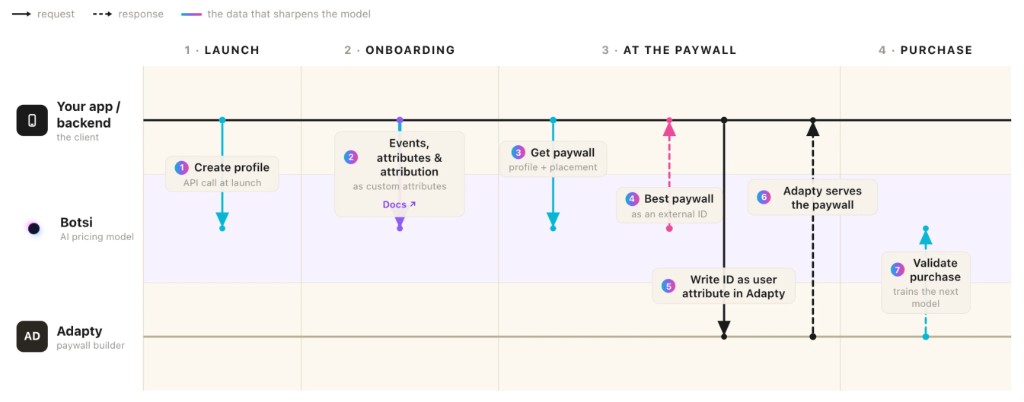
- Create a Botsi Profile at launch and keep the
profileId. - Send events, attributes, and attribution during onboarding so the model has signal.
- Call Fetch Paywall with the profile and placement → receive the predicted
externalId(andpaywallSessionId). - Set an Adapty custom attribute to that
externalId. - Fetch the Adapty paywall for your placement → Adapty returns the paywall matched by audience targeting.
- Send
paywall_shownvia the Send Paywall Shown Event API when the paywall is presented. - Validate the purchase with Botsi after a successful Adapty transaction.
See the full API sequence in the AI Pricing Model API.
Matching paywalls in Adapty and Botsi#
Decide which prices you want to show, then configure paywalls on both sides with the same products.
In Adapty, create Paywalls with the products and price points you want to test. For several annual price points:
- Paywall
standard_paywall— annual →com.app.pro.annual_standard - Paywall
discounted_paywall— annual →com.app.pro.annual_discounted
Then create corresponding Paywalls in Botsi and attach the same Products. That is what tells the model which prices are available to choose between.
External ID and Fetch Paywall#
Set the external ID on each Botsi Paywall when you configure it. Any unique value works; a readable convention pays off when you see the same string in Adapty audiences and Botsi analytics (for example onboardingPaywall_29.99Annual_v2).
Fetch Paywall returns that value as data.externalId. You could use data.id instead, but it is a number you cannot set or recognize at a glance. Use externalId.
Audience targeting with a custom attribute#
Write the externalId into an Adapty custom attribute, then fetch the paywall. The attribute name is yours; something like botsi_paywall_id or botsi_paywall_prediction is legible to teammates. Use the externalId as the value.
Configure Adapty audiences to filter on that attribute so each predicted ID maps to the matching Adapty Paywall. See Adapty's audience docs and add audience and paywall to placement guide.
Set the attribute before fetching the paywall
Adapty resolves audience targeting when you request the paywall. An attribute written afterwards has no effect on the paywall already returned.
// Set the custom attribute with Botsi's predicted paywall ID
var builder = AdaptyProfileParameters.Builder()
builder = try builder.with(customAttribute: botsiExternalPaywallId, forKey: "botsi_paywall_id")
try await Adapty.updateProfile(params: builder.build())

// Then fetch the paywall — Adapty uses the attribute for targeting
let paywall = try await Adapty.getPaywall(placementId: "your_placement_id")// Set the custom attribute with Botsi's predicted paywall ID
Adapty.updateProfile(
params = AdaptyProfileParameters.Builder()
.withCustomAttribute("botsi_paywall_id", botsiExternalPaywallId)
.build()
) { error ->
if (error != null) {
// handle error
}
}
// Then fetch the paywall — Adapty uses the attribute for targeting
Adapty.getPaywall("your_placement_id") { result ->
when (result) {
is AdaptyResult.Success -> {
val paywall = result.value
// show paywall
}
is AdaptyResult.Error -> {
// handle error
}
}
}try {
final builder = AdaptyProfileParametersBuilder()
..setCustomAttribute('botsi_paywall_id', botsiExternalPaywallId);
await Adapty().updateProfile(builder.build());
final paywall = await Adapty().getPaywall(placementId: 'your_placement_id');
// show paywall
} on AdaptyError catch (adaptyError) {
// handle the error
} catch (e) {
// handle the error
}import { adapty } from 'react-native-adapty';
// Set the custom attribute with Botsi's predicted paywall ID
await adapty.updateProfile({
customAttributes: { botsi_paywall_id: botsiExternalPaywallId },
});
// Then fetch the paywall — Adapty uses the attribute for targeting
const paywall = await adapty.getPaywall('your_placement_id');using AdaptySDK;
// Set the custom attribute with Botsi's predicted paywall ID
var builder = new Adapty.ProfileParameters.Builder()
.SetCustomAttribute("botsi_paywall_id", botsiExternalPaywallId);
Adapty.UpdateProfile(builder.Build(), (error) => {
if (error != null) {
// handle error
}
});
// Then fetch the paywall — Adapty uses the attribute for targeting
Adapty.GetPaywall("your_placement_id", (paywall, error) => {
if (error != null) {
// handle error
return;
}
// show paywall
});Sending the impression#
When the paywall is shown, send paywall_shown with the paywallSessionId from the Fetch Paywall response. Details: Send Paywall Shown Event.
Sending the purchase#
After a successful purchase through Adapty, extract the iOS transaction ID and original transaction ID, or the Android purchase token, and post them to the matching validate endpoint.
let result = try await Adapty.makePurchase(product: product)

if let transaction = result.sk2Transaction {
    let appleTransactionId = transaction.id       // e.g. "2000001234567890"
    let originalTxId = transaction.originalID     // stable across renewals
    // POST /v2/purchases/apple-store/validate
}Adapty.makePurchase(activity, product) { result ->
when (result) {
is AdaptyResult.Success -> {
val purchaseToken = result.value?.purchaseToken
// POST /v2/purchases/play-store/validate
}
is AdaptyResult.Error -> {
// handle error
}
}
}try {
final purchaseResult = await Adapty().makePurchase(product: product);
switch (purchaseResult) {
case AdaptyPurchaseResultSuccess(profile: final profile):
// Extract StoreKit IDs or the Play purchase token from the result / profile, then:
// iOS: POST /v2/purchases/apple-store/validate
// Android: POST /v2/purchases/play-store/validate
break;
case AdaptyPurchaseResultPending():
break;
case AdaptyPurchaseResultUserCancelled():
break;
default:
break;
}
} on AdaptyError catch (adaptyError) {
// handle the error
} catch (e) {
// handle the error
}import { adapty } from 'react-native-adapty';
const purchaseResult = await adapty.makePurchase(product);
switch (purchaseResult.type) {
case 'success': {
const profile = purchaseResult.profile;
// profile.subscriptions[vendorProductId]?.vendorTransactionId
// profile.subscriptions[vendorProductId]?.vendorOriginalTransactionId
// iOS: POST /v2/purchases/apple-store/validate
// Android: POST /v2/purchases/play-store/validate
break;
}
case 'user_cancelled':
break;
case 'pending':
break;
}using AdaptySDK;
Adapty.MakePurchase(product, (result, error) => {
if (error != null) {
// handle error
return;
}
switch (result.Type) {
case AdaptyPurchaseResultType.Success:
var profile = result.Profile;
// Access vendor transaction IDs from profile subscriptions
// iOS: POST /v2/purchases/apple-store/validate
// Android: POST /v2/purchases/play-store/validate
break;
case AdaptyPurchaseResultType.UserCancelled:
break;
case AdaptyPurchaseResultType.Pending:
break;
}
});See Validate Apple Store Purchase and Validate Google Play Store Purchase. Adapty's own purchase handling is covered in their iOS, Android, and React Native purchase docs.
Notes#
- Configure server-side notifications in both Adapty and Botsi for accurate analytics.
- The custom attribute you set must match the audience filters in the Adapty dashboard, or targeting silently fails to match.
- Handle errors from both APIs. A failed Fetch Paywall should fall back to a known paywall rather than showing nothing.
- Test in sandbox before production.